Fraud awareness
CheckVault never sends payment instructions by email. Here’s how to check a request.
We never send payment details by email
CheckVault will never email, text or message you payment instructions, or ask you to pay a different account. Before you pay, log in to your CheckVault account and check the payment details there. Type app.checkvault.com.au into your browser yourself rather than following a link.
How the scam works
Scammers advertise cars and other big-ticket items online, then tell buyers the sale will go through CheckVault escrow. They send convincing documents with the CheckVault name and logo, like the two examples below, but the bank details belong to a personal account the scammer controls. Once the money is sent, the seller disappears.
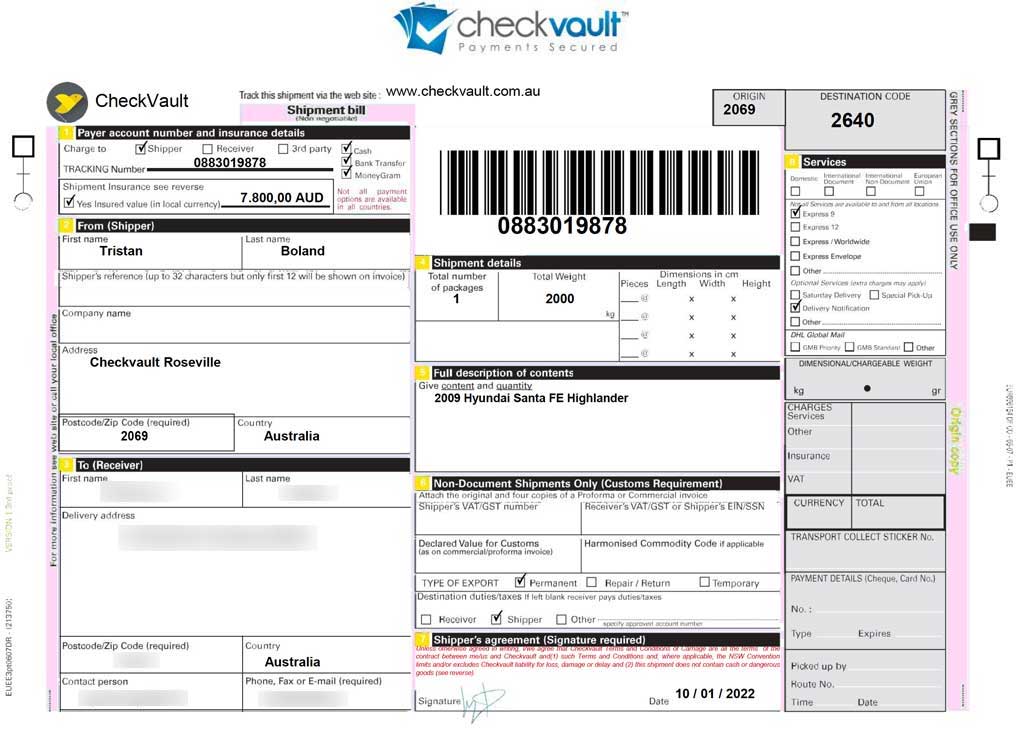
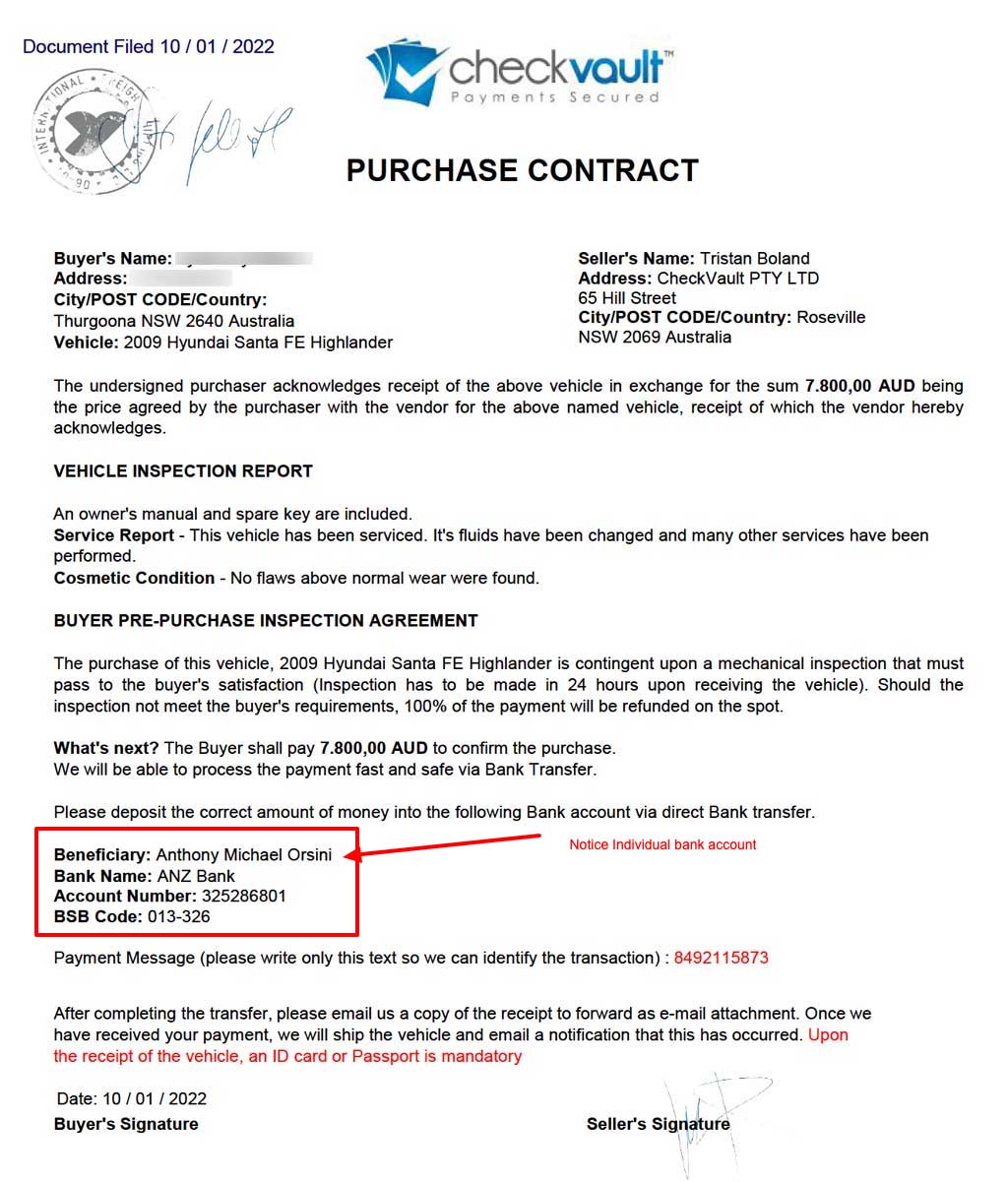
Real CheckVault payments only ever go to Perpetual Corporate Trust’s escrow account, listed further down this page.
Warning signs
- Payment details arrive by email, text or chat instead of in your CheckVault account
- The account name isn’t “Perpetual Corporate Trust as Escrow Agent for CheckVault Escrow Account”
- You’re asked to pay an account in a person’s name, or an account overseas
- The seller won’t let you see the item or meet, or pushes you to pay quickly
- Bank details change partway through a deal
- An email or website uses an address that isn’t checkvault.com.au
- You’re asked to pay by gift card, cryptocurrency or a money transfer service
Check before you pay
Log in to CheckVault and confirm the trade is there, with the amount and the other party you expect. Compare the account details with the ones on this page. If anything doesn’t match, don’t pay: call us on 1800 CVAULT or email support@checkvault.com.au.
If you’ve already paid
- Call your bank straight away and ask them to recall the payment. The sooner you call, the better the chance of getting it back.
- Report it to ReportCyber and to Scamwatch.
- Tell us at support@checkvault.com.au, so we can help and warn others.
- If you shared identity documents, IDCARE can help you protect your identity.
CheckVault payment details
These are the only accounts CheckVault payments go to. If you’ve been asked to pay any other account in relation to CheckVault or CheckGroup, don’t pay it, and contact support@checkvault.com.au.
Bank transfer
- BSB
- 012 003
- Account Number
- 836 253 366
- Account Name
- Perpetual Corporate Trust as Escrow Agent for CheckVault Escrow Account
- Bank
- ANZ Bank
From outside Australia
Use the details above, plus:
- Payee Address
- Level 14, Angel Place, 123 Pitt Street, Sydney, NSW 2000, Australia
- SWIFT BIC
- ANZBAU3M
- Bank Address
- Floor 9, ANZ Centre Melbourne, 833 Collins Street, Docklands
- Bank town
- Melbourne
- Bank postcode
- 3008
- Country
- Australia
BPAY
From a savings account: Biller code 215 152
Signing in
Before you sign in, check the address bar shows https://app.checkvault.com.au.

Where to get help
These agencies can help you report a scam or protect yourself.
- Scamwatch, run by the National Anti-Scam Centre
- ReportCyber, from the Australian Cyber Security Centre
- IDCARE, Australia’s identity and cyber support service
- Australian Federal Police
- New South Wales Police
- Northern Territory Police
- Queensland Police Service
- South Australia Police
- Tasmania Police
- Victoria Police
- Western Australia Police
Questions about a payment?
Our team is in Sydney and on the phone 8:30am to 6pm on weekdays.
Call 1800 CVAULTAlready trading with us? Log in, or call 1800 CVAULT.